Finding the right job starts with a strong resume. It is the first document a recruiter sees, and in many cases, it is also the first document reviewed by software before a human ever opens it. If your resume is difficult to read or does not match the job requirements, it may never reach the hiring manager, even if you are qualified for the position.
This is where an ATS-friendly resume becomes important.
An Applicant Tracking System, commonly known as ATS, is used by employers to organize applications and identify candidates who match the requirements of a job. While every company uses recruitment software differently, most systems are designed to extract information such as your work experience, education, skills, and certifications. A resume that is well structured and relevant gives recruiters a clearer picture of your qualifications and makes it easier for them to find the information they need.
Many online resume scanners display an “ATS score” out of 100. These scores are useful for identifying formatting or content issues, but there is no universal ATS score used by employers. Instead of chasing a perfect number, your goal should be to create a resume that communicates your experience clearly and aligns with the position you are applying for.
Job seekers can also check our Assam government recruitment updates page for newly announced vacancies.
Understand How Applicant Tracking Systems Work
An Applicant Tracking System is a recruitment tool that stores and organizes job applications. When you submit your resume through a company’s careers page or a job portal, the software extracts the information from your document and places it into a searchable database.
Recruiters can then search for candidates using job titles, technical skills, certifications, education, or years of experience. If your resume contains information that closely matches the job description, it is more likely to appear during these searches.
This does not mean the software decides who gets hired. Recruiters still make the final decision. However, a resume that is difficult to read or missing important information may not receive the same attention as one that is clearly organized.
Choose a Resume Format That Is Easy to Read
The structure of your resume matters just as much as its content.
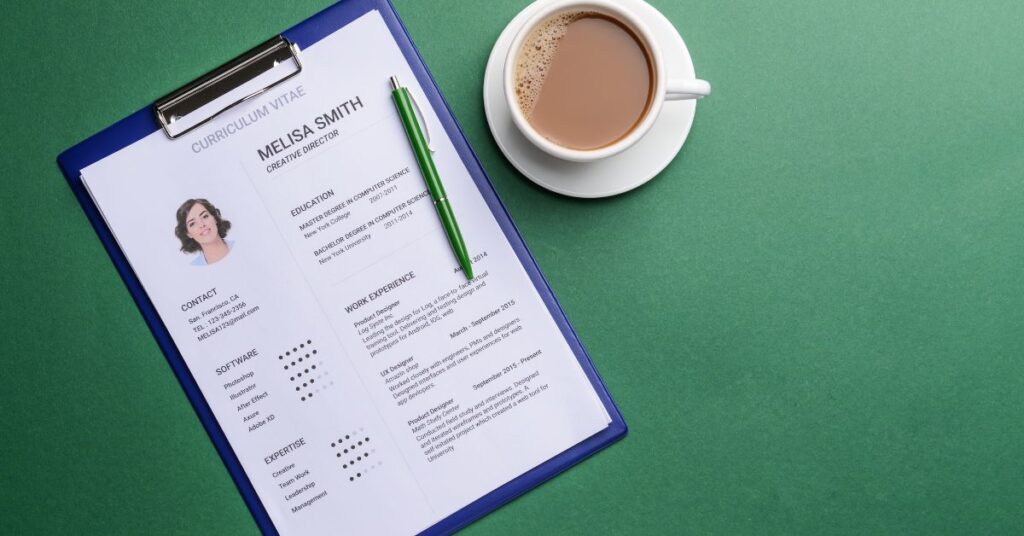
A reverse chronological format is the most widely accepted because it highlights your recent experience first. Recruiters can quickly understand your career progression without searching through multiple sections.
Use a single-column layout with consistent spacing and standard headings. This approach improves readability and reduces the possibility of important information being overlooked.
Professional fonts such as Arial, Calibri, Cambria, Georgia, or Helvetica are excellent choices because they are clean and easy to read on both desktop and mobile devices.
Avoid using decorative fonts, excessive colors, text boxes, or unnecessary graphics unless you are applying for a role where visual design is an essential requirement.
You can use our Bio Data Maker by visiting the Tools page. Create and download your professional bio-data in just a few minutes.
Start With Professional Contact Information
Your contact information should appear at the top of your resume and should be easy to find.
Include your full name, mobile phone number, professional email address, city and state, and a LinkedIn profile if it is complete and regularly updated.
If your work involves software development, graphic design, writing, photography, or another portfolio-based profession, you can also include a link to your personal website, GitHub profile, or online portfolio.
Avoid adding information that employers rarely require during the initial application process, such as your full residential address, religion, marital status, or identification numbers.
A simple and professional header immediately creates a better impression and helps recruiters contact you without difficulty

Write a Professional Resume Summary
The summary is one of the first sections recruiters read. It should provide a brief overview of your background and encourage them to continue reading the rest of your resume.
Instead of describing what you hope to achieve, explain what you already bring to the role. Mention your years of experience, key skills, industry knowledge, and one or two notable strengths that relate directly to the position.
Keep this section concise while naturally including relevant keywords from the job description. A well-written summary immediately communicates your value without overwhelming the reader.
Present Your Work Experience Clearly
Your work experience should tell the story of your professional growth.
List each position in reverse chronological order. Include your job title, employer, employment dates, and location before describing your responsibilities and accomplishments.
Rather than listing every task you performed, focus on the work that demonstrates your contribution. Explain how you solved problems, improved processes, increased efficiency, supported customers, or achieved measurable business outcomes.
Whenever possible, include numbers that add context. Recruiters appreciate specific achievements because they show the scale of your work and make your experience easier to evaluate.
If you are a recent graduate with limited professional experience, include internships, freelance work, volunteer positions, or academic projects that demonstrate relevant skills.
Highlight Your Educational Background
Education remains an important section for both freshers and experienced professionals.
Include the name of your qualification, institution, graduation year, and academic performance if it strengthens your application.
Candidates who have recently graduated may choose to place education above work experience, especially if they have limited employment history or strong academic achievements.
If you have completed specialized coursework related to the position, mentioning it can also help demonstrate your knowledge in that field.
Showcase Relevant Skills
The skills section should support everything else on your resume.
Separate technical skills from workplace skills where appropriate. Technical skills include software, programming languages, design tools, cloud platforms, or industry-specific technologies. Workplace skills include communication, teamwork, leadership, problem-solving, and time management.
Avoid creating a long list of unrelated skills. Instead, prioritize the abilities that are most relevant to the job description.
Remember that every skill listed on your resume should be one you can confidently discuss during an interview.
Include Certifications and Projects
Certifications demonstrate your commitment to learning and professional development.
Industry-recognized credentials from organizations such as Google, Microsoft, AWS, Cisco, Adobe, or HubSpot can strengthen your application when they relate to the role.
Projects are equally valuable, particularly for students and career changers. Personal projects, freelance work, research, open-source contributions, and internship assignments provide practical evidence of your abilities.
Describe what you built, the tools you used, and the outcome or purpose of the project rather than simply listing its name.
Use Keywords Naturally
Every job description contains words and phrases that describe the qualifications an employer is looking for.
Before submitting your resume, carefully read the job advertisement and identify recurring skills, technologies, certifications, and responsibilities. If these accurately reflect your experience, incorporate them naturally into your professional summary, work experience, and skills section.
Avoid copying large portions of the job description or repeating the same keywords excessively. Recruiters can easily recognize keyword stuffing, and an unnatural resume is less effective than one that clearly explains your qualifications.
Your resume should always be written for people first, with ATS compatibility following naturally from clear organization and relevant content.

Keep the Design ATS-Friendly
A clean design is easier for recruiters to read and generally works well with Applicant Tracking Systems.
Use standard section headings such as Work Experience, Education, Skills, and Certifications. Maintain consistent formatting throughout the document and use bullet points to improve readability.
Avoid placing important information inside images, icons, headers, footers, or decorative elements. While many modern ATS platforms can process simple layouts accurately, a straightforward design remains the safest choice.
Save your resume in the file format requested by the employer. If no format is specified, PDF is widely accepted because it preserves formatting across different devices.
Common Resume Mistakes to Avoid
Small mistakes can reduce the effectiveness of an otherwise strong resume.
Submitting the same resume for every job is one of the most common errors. Each application should reflect the requirements of the specific position.
Spelling mistakes, grammatical errors, inconsistent formatting, outdated contact information, exaggerated claims, and irrelevant work experience can also create a negative impression.
Review your resume carefully before every application. Reading it aloud or asking someone else to proofread it often helps identify mistakes that are easy to overlook.
Review Your Resume Before Applying
Before clicking the submit button, take a few minutes to review your resume from a recruiter’s perspective.
Check that your contact information is accurate, your work experience is up to date, and every section supports the position you are applying for. Ensure the formatting is consistent, the document is easy to scan, and there are no spelling or grammar mistakes.
Tailoring your resume for each application takes a little extra time, but it can significantly improve your chances of receiving an interview invitation.
If you want to speed up the process, you can use an AI-powered resume builder to create a professional layout and customize it for different jobs. One reliable option is Resume.io, which provides ATS-friendly resume templates and editing tools.
A well-written resume does not guarantee a job offer, but it gives you the best opportunity to present your qualifications clearly and professionally. Focus on accuracy, relevance, and readability rather than chasing an arbitrary ATS score. When your resume reflects your skills honestly and aligns with the employer’s requirements, you are far more likely to move to the next stage of the hiring process.